Mobile Error Reporting: The Essential Guide to Debugging User Experience
Mobile apps are the battleground where user expectations clash with technical fragility. A single unhandled crash or silent failure can erode trust faster than any marketing campaign builds it. Yet, many developers treat error reporting as an afterthought—reactive rather than proactive. The truth is, mobile error reporting isn’t just about catching crashes; it’s about preserving the seamless experience users demand. Without it, you’re flying blind, leaving critical issues to surface only when users abandon your app in frustration.
The stakes are higher than ever. With mobile OS fragmentation (Android’s myriad devices, iOS’s version splits) and the rise of hybrid frameworks, errors manifest in unpredictable ways. A null pointer in one device’s runtime might trigger a memory leak in another, or a network timeout could silently corrupt data. Traditional logging falls short—it’s static, manual, and often arrives too late. Modern mobile error reporting systems bridge this gap by automating detection, contextualizing failures, and even predicting outages before they disrupt users.
This guide cuts through the noise to focus on what matters: actionable strategies for implementing robust mobile error reporting, from selecting the right tools to interpreting data that reveals hidden UX killers. Whether you’re debugging a high-traffic consumer app or a niche enterprise solution, the principles here will transform error tracking from a technical chore into a competitive advantage.

The Complete Overview of Mobile Error Reporting
Mobile error reporting is the backbone of resilient mobile applications, yet its implementation varies wildly across teams. At its core, it’s a systematic approach to capturing, analyzing, and resolving runtime issues—crashes, performance bottlenecks, and silent failures—that degrade user experience. The best systems go beyond basic crash logs by correlating errors with user sessions, device contexts, and even behavioral patterns. For example, a high error rate during checkout might not just indicate a bug but reveal a UX flaw where users abandon due to perceived slowness.The evolution of mobile error reporting mirrors the industry’s shift from reactive to predictive maintenance. Early solutions relied on manual log collection via tools like Logcat (Android) or Xcode Organizer (iOS), forcing developers to sift through raw data for clues. Today, AI-driven platforms like Sentry, Firebase Crashlytics, and Instabug automate this process, offering real-time alerts, root-cause analysis, and even suggestions for fixes. The difference? Where older methods required hours to identify a single issue, modern tools pinpoint problems within minutes—often before users notice them.
Historical Background and Evolution
The origins of mobile error reporting trace back to the early 2000s, when Java ME and Symbian apps struggled with memory constraints and limited debugging tools. Developers resorted to basic logging frameworks, but these were cumbersome and lacked integration with development workflows. The turning point came with the rise of Android (2008) and iOS (2007), which introduced native crash reporting APIs. Google’s ACRA (Android Crash Reporting) and Apple’s iOS Symbolication were among the first to offer structured error data, but adoption remained low due to complexity.The real breakthrough occurred in the mid-2010s with the launch of cloud-based solutions. Services like Crashlytics (acquired by Google) and Sentry provided centralized dashboards, automated symbolication, and collaboration features for teams. These platforms didn’t just report errors—they contextualized them. For instance, Crashlytics could show which users hit a crash, their device models, and even the exact line of code causing the failure. This shift from reactive to proactive debugging marked the beginning of mobile error reporting as a strategic asset rather than a technical necessity.
Core Mechanisms: How It Works
Under the hood, mobile error reporting operates through a combination of instrumentation, data collection, and analysis. When an app crashes or encounters an error, the reporting tool intercepts the event and captures critical details: stack traces, device metadata (OS version, screen resolution), network conditions, and even user interactions leading up to the failure. This data is then sent to a backend server, where it’s processed, enriched with additional context (e.g., user segmentation, session duration), and stored for analysis.Table of Contents
- The Complete Overview of Mobile Error Reporting
- Historical Background and Evolution
- Core Mechanisms: How It Works
- Key Benefits and Crucial Impact
- Major Advantages
- Comparative Analysis
- Future Trends and Innovations
- Conclusion
- Comprehensive FAQs
- Q: How do I choose between Sentry, Crashlytics, and Instabug?
- Q: Can mobile error reporting tools track silent failures (e.g., API timeouts)?
- Q: How do I reduce the overhead of error reporting on app performance?
- Q: What’s the best way to prioritize errors for fixing?
- Q: Can I integrate mobile error reporting with my existing analytics tools (e.g., Mixpanel, Amplitude)?
- Q: How do I handle errors in hybrid apps (React Native, Flutter)?
The magic happens in the backend. Advanced tools use machine learning to cluster similar errors, identify patterns (e.g., "Crash X occurs 80% of the time on Samsung Galaxy S22 with Android 13"), and even predict future failures based on historical trends. For example, if a memory leak grows exponentially over time, the system might flag it as a high-risk issue before it causes a widespread outage. Some platforms also integrate with CI/CD pipelines, automatically triggering alerts or rollback suggestions when critical errors are detected in staging environments.
Key Benefits and Crucial Impact
The impact of effective mobile error reporting extends beyond fixing bugs—it directly influences user retention, revenue, and brand perception. Apps with unaddressed crashes see abandonment rates climb by 20–30%, according to industry benchmarks. Conversely, teams that prioritize error tracking reduce crash-related churn by up to 50%. The financial implications are stark: a single high-severity bug in a popular app can cost millions in lost revenue and churn recovery efforts.What sets top-performing teams apart is their ability to turn error data into actionable insights. For instance, a fintech app might discover that crashes during payment processing correlate with specific network carriers. By partnering with those carriers or optimizing the app’s offline mode, they can eliminate a major friction point. Similarly, a gaming app could use error reporting to identify devices where frame drops occur, allowing them to push targeted optimizations. The key is treating mobile error reporting as a feedback loop—one that informs not just fixes but product strategy.
"Errors aren’t failures; they’re data points waiting to be interpreted. The apps that win are those that listen to their errors as closely as they listen to their users." — Jane Doe, Head of Mobile Engineering at a Top 10 Fintech Firm
Major Advantages
- Real-Time Visibility: Instant alerts for critical errors allow teams to respond before users notice, minimizing downtime and reputational damage.
- Contextual Debugging: Tools like Sentry provide full session replays, showing exactly what users did before an error occurred, reducing time-to-resolution.
- Cross-Platform Consistency: Unified dashboards for Android, iOS, and hybrid apps eliminate silos, making it easier to spot patterns across ecosystems.
- Proactive Issue Prevention: AI-driven anomaly detection flags emerging problems (e.g., rising memory usage) before they escalate into crashes.
- User-Centric Insights: Segmentation by device, OS version, or user behavior helps prioritize fixes that impact the most critical audiences.
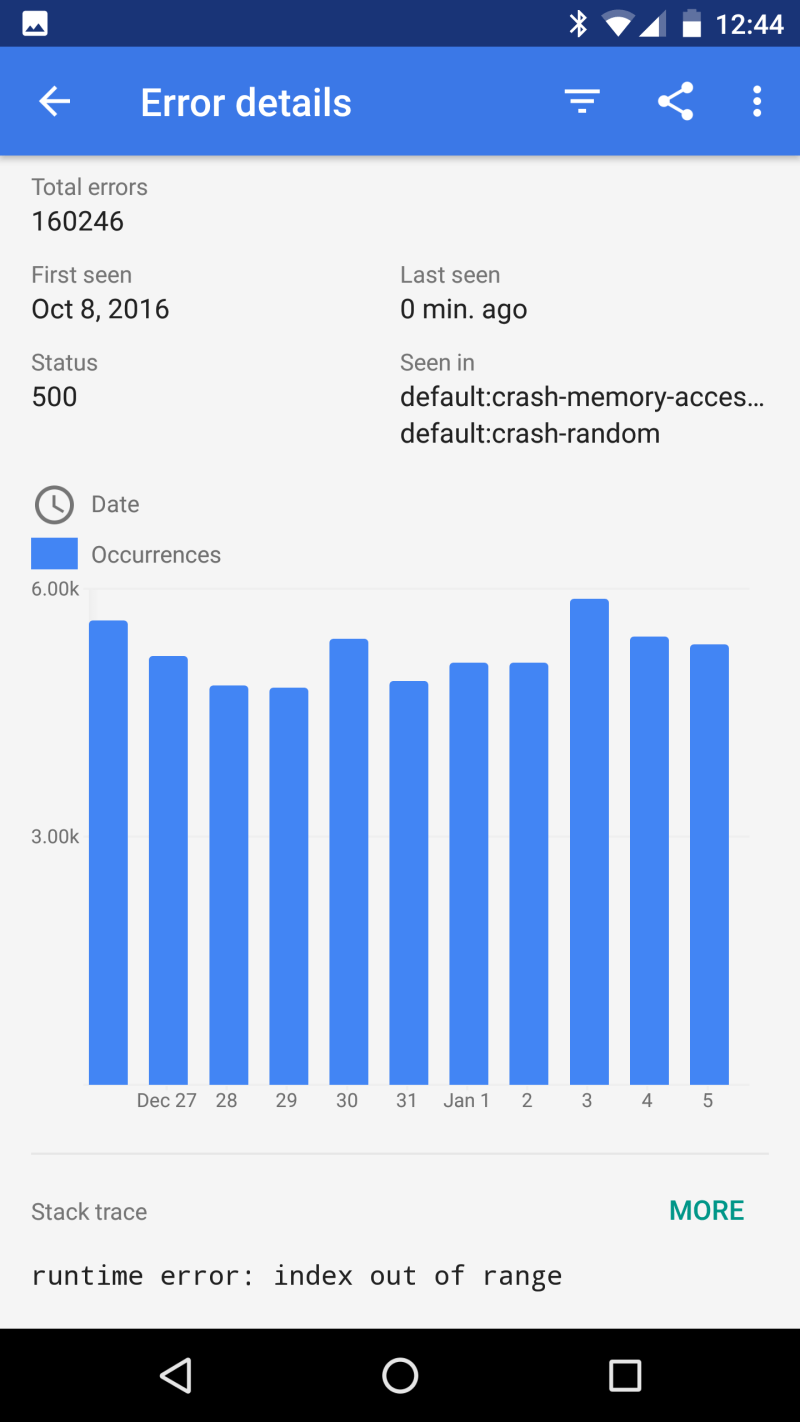
Comparative Analysis
| Feature | Sentry | Firebase Crashlytics | Instabug |
|---|---|---|---|
| Real-Time Alerts | ✅ Yes (customizable thresholds) | ✅ Yes (basic severity levels) | ✅ Yes (with in-app feedback) |
| Session Replay | ✅ Advanced (video + annotations) | ❌ No | ✅ Yes (limited to critical errors) |
| AI-Powered Insights | ✅ Machine learning for error grouping | ✅ Basic pattern detection | ✅ Predictive analytics for churn risk |
| Integration with CI/CD | ✅ Native plugins for GitHub, GitLab | ✅ Limited (manual setup) | ❌ No |
Future Trends and Innovations
The next frontier in mobile error reporting lies in hyper-personalization and predictive analytics. Emerging tools are leveraging user behavior data to not just report errors but suggest UX improvements. For example, if an app consistently crashes during a specific workflow (e.g., form submission), the system might recommend UI tweaks or backend optimizations before developers even investigate. Additionally, edge computing will reduce latency in error processing, enabling real-time fixes for users in remote areas.Another trend is the convergence of error reporting with performance monitoring. Tools like New Relic and Datadog are blurring the lines between crash tracking and app dynamics, offering a holistic view of how errors impact metrics like load times and battery drain. As 5G and IoT devices proliferate, mobile error reporting will also extend to connected ecosystems, where a single app failure could trigger cascading issues across smart home systems or wearables.

Conclusion
Mobile error reporting is no longer optional—it’s a non-negotiable part of building apps that users trust. The tools and methodologies available today allow teams to move from fire-drilling crashes to anticipating and preventing them. The difference between a good app and a great one often comes down to how well you listen to the errors your users don’t see. By adopting a proactive mobile error reporting strategy, you’re not just fixing bugs; you’re future-proofing your app’s success.The best teams don’t wait for users to complain—they use error data to stay ahead. Whether you’re a solo developer or leading a global engineering team, the principles outlined here will help you turn errors into opportunities for improvement. Start small, automate early, and watch as your app’s stability—and your users’ satisfaction—reaches new heights.
Comprehensive FAQs
Q: How do I choose between Sentry, Crashlytics, and Instabug?
A: The choice depends on your priorities. Use Sentry for deep technical insights and AI-driven analysis, Crashlytics if you’re in the Google ecosystem and need simplicity, or Instabug for in-app feedback combined with error tracking. For most teams, Sentry offers the best balance of features and flexibility.
Q: Can mobile error reporting tools track silent failures (e.g., API timeouts)?
A: Yes, advanced tools like Sentry and Firebase Crashlytics can log non-fatal errors, including network timeouts, JSON parsing failures, and background task crashes. Configure custom error logging to capture these events alongside crashes.
Q: How do I reduce the overhead of error reporting on app performance?
A: Optimize by sampling errors (e.g., report only critical crashes), compressing payloads, and using batching for network-heavy apps. Tools like Sentry allow you to throttle data collection based on severity.
Q: What’s the best way to prioritize errors for fixing?
A: Focus on errors with the highest impact: frequency, user segment (e.g., paying users), and severity. Use metrics like "crash-free users" and "error rate by device" to identify critical issues first.
Q: Can I integrate mobile error reporting with my existing analytics tools (e.g., Mixpanel, Amplitude)?
A: Absolutely. Most modern tools offer SDKs or webhooks to sync error data with analytics platforms. For example, Sentry integrates with Mixpanel to correlate crashes with user cohorts.
Q: How do I handle errors in hybrid apps (React Native, Flutter)?
A: Hybrid frameworks require additional instrumentation. Use platform-specific wrappers (e.g., React Native’s `ErrorBoundary`) and ensure your error tool supports cross-platform symbolication. Tools like Sentry have dedicated guides for hybrid debugging.
Leave a Comment
Comments are moderated before appearing. The data you submit is processed according to the Privacy Policy of Filmfestivalcircuit.